Arduino Piano Using 6 Push Buttons and Buzzer
Description
In this project, we will build a simple Arduino Piano using an Arduino UNO, 6 push buttons, and a buzzer. Each push button is assigned a different musical note, allowing us to create different sounds by pressing the buttons.
The Arduino reads the button inputs and generates corresponding frequencies using the tone() function. Each button produces a different musical note, from C4 to A4. This project is useful for understanding digital inputs, INPUT_PULLUP, buzzer operation, and sound generation using Arduino UNO.
Components Required
| Component | Quantity |
|---|---|
| Arduino UNO | 1 |
| Breadboard | 1 |
| Push Buttons | 6 |
| Buzzer | 1 |
| Jumper Wires | As required |
Circuit Diagram
Connect the 6 push buttons and buzzer to the Arduino UNO according to the circuit diagram and connection tables below. Each push button is connected between its respective digital pin and GND. The buzzer is connected to digital pin D8.
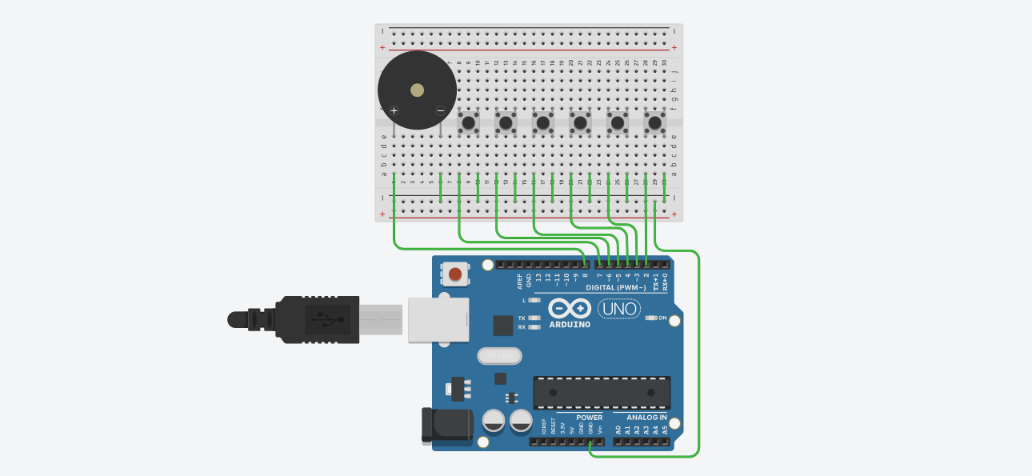
Pin Connection Table
Buzzer → Arduino UNO
| Buzzer Pin | Arduino UNO Pin |
|---|---|
| Positive (+) | D8 |
| Negative (-) | GND |
6 Push Buttons → Arduino UNO
| Push Button | Arduino UNO Pin |
|---|---|
| Button 1 | D2 and GND |
| Button 2 | D3 and GND |
| Button 3 | D4 and GND |
| Button 4 | D5 and GND |
| Button 5 | D6 and GND |
| Button 6 | D7 and GND |
Working Principle
When a push button is pressed, it connects its respective Arduino digital pin to GND. Since the pins are configured as INPUT_PULLUP, Arduino detects the pressed button as LOW. The Arduino then generates a specific frequency using the tone() function on pin D8. Each button produces a different musical note, and when no button is pressed, the buzzer stops producing sound using the noTone() function.
Arduino Code
// Creative Inventions
// Subscribe to my YouTube channel

// Push Button Pins
const int buttonPins[6] = {7, 6, 5, 4, 3, 2};

// Buzzer Pin
const int buzzerPin = 8;

// Musical Notes (C4 to A4)
const int notes[6] = {
  262, 294, 330, 349, 392, 440
};

void setup() {

  // Configure push buttons as INPUT_PULLUP
  for (int i = 0; i < 6; i++) {
    pinMode(buttonPins[i], INPUT_PULLUP);
  }

  // Configure buzzer as OUTPUT
  pinMode(buzzerPin, OUTPUT);
}

void loop() {

  bool buttonPressed = false;

  // Check all six push buttons
  for (int i = 0; i < 6; i++) {

    if (digitalRead(buttonPins[i]) == LOW) {

      // Generate the corresponding musical note
      tone(buzzerPin, notes[i]);

      buttonPressed = true;
      break;
    }
  }

  // Stop buzzer when no button is pressed
  if (!buttonPressed) {
    noTone(buzzerPin);
  }
}